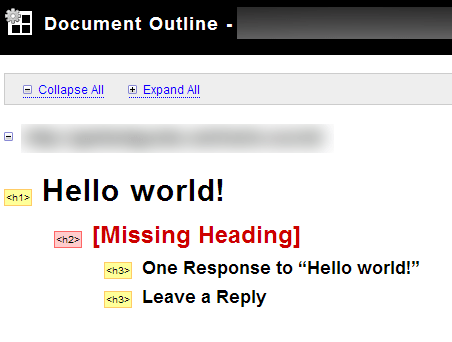


Ideally, your most important heading for each page should be wrapped in an h1 tag, the next most important headings in h2, and so on. Wordpress does a great job at this out of the box for the home page, wrapping your blog name with an h1 tag and all your individual post titles on the homepage in an h2 tag. Unfortunately, it doesn't do a good job with single post pages.
By default, single posts have the same outline format as the home page...blog title wrapped in h1 and post title wrapped in h2. But don't you want your post title, at least on the individual post pages to be seen as the most important heading on that page? Of course you do...here's how...
Wordpress homepage default outline setup (good)...
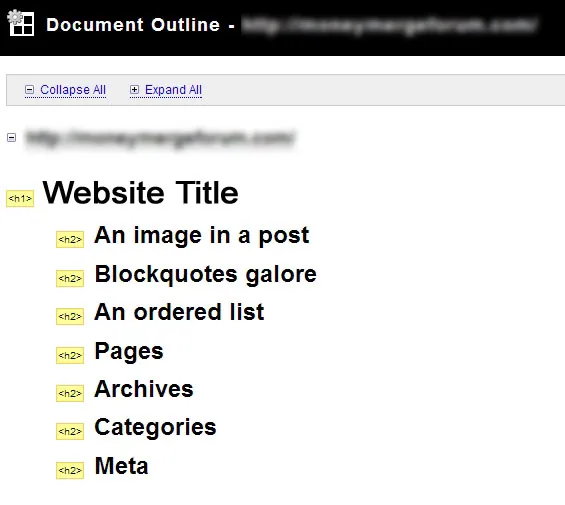
And the Wordpress default single post outline setup (bad)...
Find the following code in your single.php file:
1 2 | <div class="post" id="post-<?php the_ID(); ?>"><h2><a href="<?php echo get_permalink() ?>" rel="bookmark" title="Permanent Link: <?php the_title_attribute(); ?>"><?php the_title(); ?></a></h2> |
…and change the h2 tags to h1 tags like so:
1 2 | <div class="post" id="post-<?php the_ID(); ?>"><h1><a href="<?php echo get_permalink() ?>" rel="bookmark" title="Permanent Link: <?php the_title_attribute(); ?>"><?php the_title(); ?></a></h1> |
Step 2 – Remove h1 Tag from Blog Title on Single Posts & Pages:
Thanks to reader Brian Brandt from WordPress-Themes.dk for pointing out the fact that this post originally did not recommend removing the h1 tag from the blog title on single posts & pages, leaving 2 h1 tags on each single post/page. Here are the steps to remove that h1 tag on any page besides the home page.
Open up header.php and find the following line:
1 | <h1><a href="<?php echo get_option('home'); ?>"><?php bloginfo('name'); ?></a></h1> |
Then change it to this:
1 2 3 4 5 6 7 | <?php if(is_home()) : ?> <h1><a href="<?php echo get_option('home'); ?>"><?php bloginfo('name'); ?></a></h1><?php else : ?> <span id="blogTitle"> <a href="<?php echo get_option('home'); ?>"><?php bloginfo('name'); ?></a> </span><?php endif; ?> |
Step 3 – Style the New #blogTitle Id and New h1 Tags
Now open up your stylesheet and add this code…you may need to tweak this a bit depending on what theme you're using and whether you've customized it (this article is based on the default theme that ships with WordPress).
1 2 3 4 5 6 7 8 9 10 11 12 13 14 15 16 17 18 19 20 21 22 23 | span#blogTitle { display: block; font-size: 4em; text-align: center; padding-top: 70px; font-weight: bold; font-family: 'Trebuchet MS','Lucida Grande',Verdana,Arial,Sans-Serif;}span#blogTitle a { color: white; text-decoration: none;}span#blogTitle a:hover { text-decoration: none;}.post h1 { color: #333333; text-decoration: none; font-size: 1.6em; text-align: left; padding-top: 0;} |
Explanation of Changes
Basically, what we've done in Step 2 above is we took the original code that displays the blog title and wrapped it with an if statement. The first part of that if-statement is saying, "if the currently displayed page is the home page, then show the blog title wrapped in h1 tags, otherwise (if the current page is NOT the home page, display the blog title, but wrap it in the tags.
If we left it at that, we'd lose the styling of the blog title on anything but the home page and the styles of our post/page titles on single posts and pages wouldn't be correct since, because we changed it from h2 to h1, we'd end up with the post and page titles looking the same as our blog title on the home page…instead we want those titles to be styled the same as the h2 post/page titles on the home page.
So we first need to style that blogTitle Id we assigned to the element. The way you style this will vary depending on which theme you're currently using and how that theme is styled. The sample code in Step 3 is specifically for the default WordPress theme, but it'll give you a starting point if you use a different theme.
Second, we create a new style for .post h1 as seen in step 3 above. Again, the styles shown above are geared toward the default WordPress theme…if you use another theme, you'll need to tweak those styles a bit.
Now your outline looks more like it should and search engines will be better equipped to understand what all of your posts are about. And finally…
New Document Outline
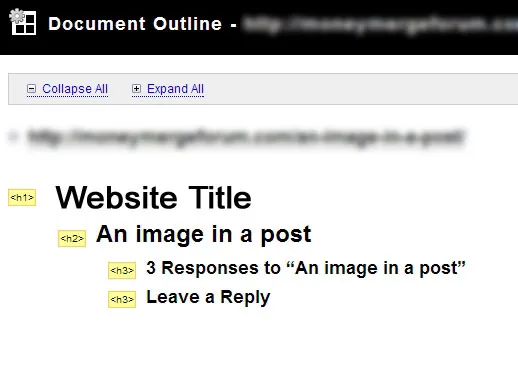
One thing you'll notice in the following image is that I'm missing an h2 tag on this page. For most sites, my article headings are h2, since we're looking at a post with only one paragraph and no headings, we're missing h2 tags.
Another option you may want to consider is removing the h3 tags you see below attached to "One Response…" and "Leave a Reply", because, in my opinion, they really don't do anything.
Nonetheless, for most situations, as long as your h1 tags are in order, the others aren't quite as important.