

Where intelligence is put to the test.

5 Minute Professional WordPress Comment Styles

John Crenshaw in wordpress

Oct 16

Comment styles will really set your blog apart. It’s something that is all too often overlooked in blog design, but it’s one of those finishing touches that really round out a well-designed WordPress theme. In this article we’ll have you styling your WordPress comments like a pro in 5 minutes.

Let’s start taking a look at the source code of the comments section. The following screenshot is the source for the default comments on my Default WordPress theme:
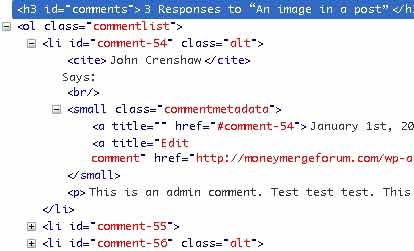
Default WordPress comment output

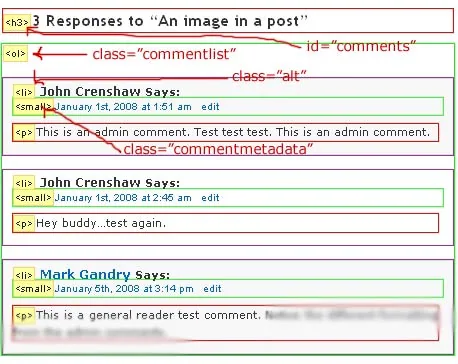
As you can see, by default, WordPress assigns certain classes to the comments section just to make it easy for you to style it. Here’s an image of what’s displayed, followed by the same image with the important elements outlined:
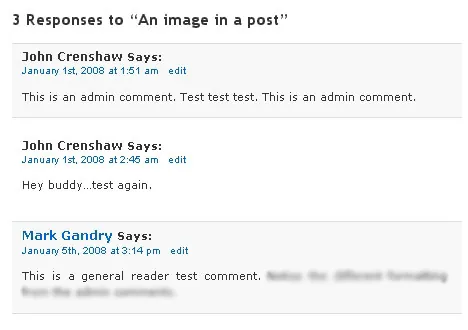
WordPress comment styles rendered
How those WordPress comment styles are rendered
Rendered WordPress comment styles detail
Outline of major elements in the rendered comments

So, you should be able to see from the two figures above that we just need to reference the ids and classes that wordpress automatically assigns to the comments in our style.css file.

So, using Figure 3 above as a reference, if we want to style the heading that says “3 Responses to ‘An image in a post’ ” so that the text is blue, we’d need to add an entry to our style.css file like so:

1
2
3
h3#comments {
    color: blue;
}

Then if we wanted to, say, outline the entire comment section with a big, ugly, red 5 pixel border, we’d add an entry to style.css like so:

1
2
3
ol.commentlist {
    border: 5px solid red;
}

As you can see, just by using the classes and ids that WordPress auto-assigns certain elements, you can really control the way comments are displayed. In the future I’ll get a bit more specific and show some examples of what can be done with this technique.

Written by John Crenshaw

More from John Crenshaw
Choosing the Right Enterprise SEO Agency: 2026 Vetting Guide

Scaling organic search for a large organization is fundamentally different from small business SEO. You're not just optimizing a few dozen pages; you're managing tens of thousands, or even millions,…

How to Do a Website Audit That Actually Boosts Revenue

So, you need to do a website audit. At its core, this means systematically breaking down your site’s technical health, on-page content, and user experience to find out what’s holding…

7 Powerful YouTube Dashboard Examples to Master Your Channel in 2026

YouTube's native analytics are powerful, but they don't always tell the whole story or connect performance to your broader marketing goals. A well-designed dashboard transforms raw data into a strategic…

Data driven marketing strategies: A Practical Growth Guide

Data-driven marketing strategies live and die by the quality of your customer data. It's the bedrock. Without a solid foundation, you're just guessing. Confused about where to start? Get a…

How to Calculate Marketing ROI and Prove Your Real Impact

Let's cut right to the chase. The simplest way to figure out your marketing return on investment is with this formula: (Revenue - Marketing Investment) / Marketing Investment. This little…

The Ultimate 10-Point PPC Audit Checklist for 2025

Pouring money into PPC campaigns without regular, in-depth audits is like navigating a maze blindfolded. You're moving, but are you getting closer to your goal? Many businesses leak significant portions…

Ready to talk? We’re listening.

If you have questions we have answers. And probably some questions for you, too.

Let’s get after it!

Let's Get Started