


Where intelligence is put to the test.

Multiple WordPress Sidebars with get_sidebar()

John Crenshaw in wordpress

Oct 16

In this article I show you how to use the get_sidebar() function to call multiple sidebars (as many as you want) in your WordPress theme.
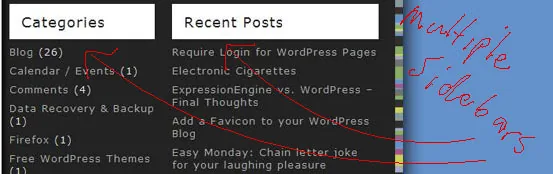
WordPress Multiple Sidebars
Example of using multiple sidebars in WordPress

If you’ve been theming WordPress for a bit you may have come across the need for multiple sidebars, but you may have also realized that the default method of including a sidebar, using the get_sidebar() function, only allows you to include a single sidebar named sidebar.php (without using parameters). There’s one obvious way to include a sidebar and that’s by using a standard php include like so:

1
include('TEMPLATEPATH . '/right-sidebar.php';

This method works, but in the interest of keeping our code readable and simplifying the inclusion of multiple sidebars, there’s an easier way to do this and it’s incredibly simple.

Including sidebar-left.php and sidebar-right.php using get_sidebar

Let’s say we’ve got two sidebars, right and left, and we’ll name the files sidebar-right.php and sidebar-left.php respectively. To include those files, all we have to do is use the get_sidebar function but add parameters to each function call to tell WordPress which sidebar we want included where.

To include the file “sidebar-right.php” we’ll use:

1
get_sidebar('right');

And to include our other sidebar, “sidebar-left.php” we’ll use:

1
get_sidebar('left');

Likewise, if we want to include a third sidebar, sidebar-right-2.php for example, we’ll use:

1
get_sidebar('right-2');

Syntax of get_sidebar()

It’s that simple. The key to remember here is that, as commentator Rakeshkumar Mehta points out, the get_sidebar function prepends “sidebar- to the argument you feed it, so all your sidebar files should start with “sidebar-“. For example, to include a file named sidebar-newsidebar.php, use get_sidebar(‘newsidebar’), or to include a file named sidebar-my_right_sidebar.php, use get_sidebar(‘my_right_sidebar’).

Written by John Crenshaw

More from John Crenshaw
Choosing the Right Enterprise SEO Agency: 2026 Vetting Guide

Scaling organic search for a large organization is fundamentally different from small business SEO. You're not just optimizing a few dozen pages; you're managing tens of thousands, or even millions,…

How to Do a Website Audit That Actually Boosts Revenue

So, you need to do a website audit. At its core, this means systematically breaking down your site’s technical health, on-page content, and user experience to find out what’s holding…

7 Powerful YouTube Dashboard Examples to Master Your Channel in 2026

YouTube's native analytics are powerful, but they don't always tell the whole story or connect performance to your broader marketing goals. A well-designed dashboard transforms raw data into a strategic…

Data driven marketing strategies: A Practical Growth Guide

Data-driven marketing strategies live and die by the quality of your customer data. It's the bedrock. Without a solid foundation, you're just guessing. Confused about where to start? Get a…

How to Calculate Marketing ROI and Prove Your Real Impact

Let's cut right to the chase. The simplest way to figure out your marketing return on investment is with this formula: (Revenue - Marketing Investment) / Marketing Investment. This little…

The Ultimate 10-Point PPC Audit Checklist for 2025

Pouring money into PPC campaigns without regular, in-depth audits is like navigating a maze blindfolded. You're moving, but are you getting closer to your goal? Many businesses leak significant portions…

Ready to talk? We’re listening.

If you have questions we have answers. And probably some questions for you, too.

Let’s get after it!

Let's Get Started