


Another quick bug fix for you. Another little quirk about Internet Explorer is the way in renders the overflow property. I've found two problems with this. First is that without a specified width, IE treats the overflow property, no matter how it's set, as overflow: visible; Second, even after we've solved that problem, IE tends to cut off the bottom portion of the element if there is a scroll bar, as if it wasn't taking the height of the scroll bar into account in its rendering, so let's dive into these real quick.
First of all, if a width is not specified for the given element, IE will treat it like overflow: visible; causing the element to continue outside of where you want it, like this:
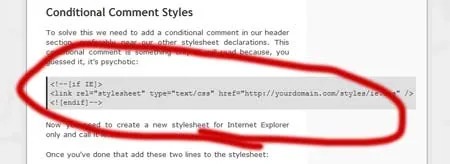
In order to fix this you need to create a stylesheet just for IE (That's explained in the last half of this article if you don't know how to do that). Once you've done that, add the following styles to the IE-only stylesheet, where ".element" is the class of the element you're working with:[
1 | .element { overflow-y: auto; overflow-x: visible; width: 450px; } |
IE understands overflow-y and overflow-x, and the width is whatever width you want the element to be and it must be set to prevent this problem. In my case, I wanted the element to be as wide as the containing element, which was 450px.
Once you do this, you'll notice this problem:

Ok, IE, you've really outdone yourself on stupidity this time. It looks like IE is not taking the scroll bar into account in the height of the element. So, now we need to fix that by adding padding-bottom: 20px; to the IE-only stylesheet, and here's what we get:
1 | .element { overflow-y: auto; overflow-x: visible; width: 450px; padding-bottom: 20px; } |
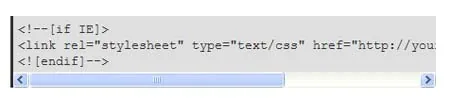
Voila! Problem solved. Keep in mind, this isn't a perfect solution...the problem with this is that IE will add that 20px padding at the bottom of the element even if there isn't a scroll bar, leaving you with some extra space on the bottom of your element in this case. One day soon, hopefully all browsers will render pages in the same way; until then, solutions like these will have to work.