

A really useful feature of WordPress is it's ability to set posts to be published at some future date, allowing you to write posts en masse and have them published one at a time at regular intervals. But what if you want those future-dated posts to actually show up on your site now instead of later? What could anyone possibly need this functionality for, you might ask? How about an upcoming events list? I needed to get that exact problem solved for a project I was working on...here's how it's done.
The Setup
For this task I decided to create a separate category for the list of events, or multiple categories for multiple events lists. This way, visitors can click on a category link to "Upcoming Events," or something like that, and they'll be taken to a category page displaying events in ascending chronological order, but no past events will be displayed.
This is actually fairly simple to get done...one thing to note is that we'll be using the categories page template for this - archive.php in most themes - so if you don't like that template for your events list, you'll need to create one you do like.
Create the Events List Category
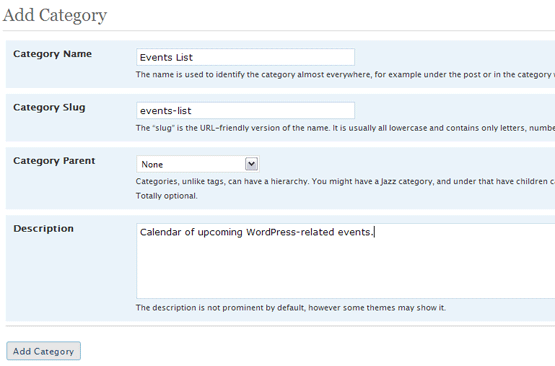
Call it whatever you want, but I'm calling mine "Events List," and giving it a page slug, "events-list". Remember the page slug you use as we'll need that in one of the next steps.
Edit Your Categories Page Template
The vast majority of themes use archive.php (not archives.php) as the category template, so open up that file for editing and find where the loop begins with this line:
1 | <?php while (have_posts()) : the_post(); ?> |
Now change it to this:
1 2 3 4 5 6 7 8 9 10 11 | <?phpif(is_category('events-list')) query_posts($query_string . '&order=ASC&post_status=future,publish');while (have_posts()) : the_post(); if(is_category('events-list')) { if(strtotime($post->post_date) < time()) continue; }?> |
A couple things you should note about that code:
- 'events-list' is the category slug I assigned when I created my events category.
- All we did here was add two lines before the while-loop and four lines after the while-loop
- You should also notice these lines were added within the existing tags because all php code must be between those tags.
Explanation of Code Changes
Ok, this code is fairly simple. All we're doing here is saying, "If we're displaying the category with page slug 'events-list', sort posts into ascending chronological order and show all posts with a status 'future' and 'publish' (meaning all posts that are currently published and any future dated posts)." Then, inside the loop we say, "if the post about to be displayed is in the category 'events-list', then check the post time...if that post time was anytime before now, skip this loop iteration." (continue tells php to skip this iteration of the loop, which means the post is not displayed.
Step by Step
Always start a block of php code with the opening query_post() function to change the sort order to ascending, and to tell WordPress to show both published posts and future dated posts. The $query_string variable holds the existing query string and we simply add our "modified" query to it. Without that variable we'd end up with a list of all future and published posts shown in ascending order when all we want are future and published posts from the "Events List" category sorted in ascending order.
1 2 3 4 5 6 7 8 9 10 11 12 13 | <?phpif(is_category('events-list')) query_posts($query_string . '&order=ASC&post_status=future,publish');[/php]Next we start "the loop"...pretty standard. Understanding the loop will help here. Our query_posts() function basically told WordPress to pull all of the posts matching our query out of the database (all posts in the "Events List" category, with future or publish status, sorted in ascending chronological order). Now the following code tells WordPress to loop through each one of those posts that it pulled from the database, one at a time.[php]while (have_posts()) : the_post();[/php]Now we're inside the loop, meaning we're essentially looking at one post at a time here, so we can access a post-specific variable called, creatively, $post. That variable holds a lot of information about the post that is currently being returned by the loop, and one thing we want to do is prevent any posts that are old from being displayed - because who wants an events list full of events that already happened?So we convert the post date to a timestamp using php's <a title="strtotime" href="http://us3.php.net/manual/en/function.strtotime.php">strtotime()</a> function and then compare it to the current timestamp. If the post's timestamp is less than the current timestamp, it's old and we don't want to display it, so we <a title="Continue" href="http://us3.php.net/manual/en/control-structures.continue.php"><em>continue</em></a> on to the next iteration of the loop right then and there. And finally we add a closing php tag:[php]if(is_category('events-list')) { if(strtotime($post->post_date) < time()) continue; }?> |
Conclusion
No doubt there are other ways to get this done...one I considered was using a custom field to save the event date, but in the end, using query_posts() the way I did saves a lot of unnecessary coding.